Sunday, 26 June 2022

Spring Part 04 - Setter Injection (Class)

Spring - Dependency Injection

Dependency Injection using class

Sample Program for Dependency Injection using 'Spring Framework'

beans_di.xml

<?xml version="1.0" encoding="UTF-8"?>
<beans 
xmlns="http://www.springframework.org/schema/beans"
       
xmlns:xsi="http://www.w3.org/2001/XMLSchema-instance"
       
xsi:schemaLocation="http://www.springframework.org/schema/beans
        https://www.springframework.org/schema/beans/spring-beans.xsd"
>

    <bean 
id="car" class="com.ah.di.Car">
        <property 
name="engine">
            <bean 
class="com.ah.di.Engine"/>
        </property>
    </bean>

</beans>


package com.ah.di;
import
org.springframework.context.ApplicationContext;
import
org.springframework.context.support.ClassPathXmlApplicationContext;
public class
Test {
   
public static void main(String[] args) {
        ApplicationContext context =
new ClassPathXmlApplicationContext("beans_di.xml");
       
Car car = context.getBean("car",Car.class);
       
car.checkCarEngine();
   
}
}


package com.ah.di;

public class
Car {
   
private Engine engine;

    public void
setEngine(Engine engine) {
       
this.engine = engine;
   
}
   
public void checkCarEngine(){
       
if(engine!=null){
           
engine.testEngine();
       
}else{
            System.
out.println("Engine is dead");
       
}
    }
}

package com.ah.di;
public class
Engine {
   
public void testEngine(){
        System.
out.println("engine is working" );
   
}
}


                                                                         Watch Demo


Spring Part 03 - Constructor Injection

 Spring - Construction Injection

Maven Dependency:

<dependency>

  <groupId>org.springframework</groupId>

  <artifactId>spring-context</artifactId>

  <version>5.3.16</version>

</dependency>


Sample Program for Construction Injection using 'Spring Framework' 

beans_di.xml
<?xml version="1.0" encoding="UTF-8"?>
<beans
xmlns="http://www.springframework.org/schema/beans"
      
xmlns:xsi="http://www.w3.org/2001/XMLSchema-instance"
      
xsi:schemaLocation="http://www.springframework.org/schema/beans
        https://www.springframework.org/schema/beans/spring-beans.xsd"
>


    <bean id="commonEngine" class="com.ah.di.Engine"/>

    <bean
id="car1" class="com.ah.di.Car">
        <constructor-arg
name="engine" ref="commonEngine"/>
    </bean>

    <bean
id="car2" class="com.ah.di.Car">
        <constructor-arg
name="engine" ref="commonEngine"/>
    </bean>
</beans>


package com.ah.di;

import 
org.springframework.context.ApplicationContext;
import 
org.springframework.context.support.ClassPathXmlApplicationContext;

public class 
Test {
    
public static void main(String[] args) {

   
/*     Engine engine = new Engine();
        Car car = new Car(engine);
        car.callEngine();*/

/*        Car car = new Car(new Engine());
        car.callEngine();*/

        
ApplicationContext context = new ClassPathXmlApplicationContext("beans_di.xml");
        
Car carObj1 = context.getBean("car1",Car.class);
        
carObj1.callEngine();

        
Car carObj2 = context.getBean("car2",Car.class);
        
carObj2.callEngine();
    
}
}


package com.ah.di;
public class
Engine {
   
public Engine() {
        System.
out.println("Engine constructor.");
   
}
   
public void engineInfo(){
        System.
out.println("engineInfo method of Engine class called.");
   
}
}

package com.ah.di;
public class
Car {
   
private Engine engine;
    public
Car(Engine engine) {
       
this.engine = engine;
   
}
   
public void callEngine(){
       
if(engine==null){
            System.
out.println("Engine is dead");
       
}else{
            System.
out.println("Engine is working");
           
engine.engineInfo();
       
}
    }
}


                                                                  Watch Demo


Tuesday, 24 May 2022

Spring Part 02 - Dependency Injection (Primitives & String)

Spring - Dependency Injection

Dependency Injection using primitives & String

Sample Program for Dependency Injection without using 'Spring Framework'

package com.ah.di.setterdemo;

public class Test {
public static void main(String[] args) {
Car car = new Car();
car.setCarName("Ford");
car.displayCarInfo();
}
}

package com.ah.di.setterdemo;

public class Car {

private String carName;

public void setCarName(String carName) {
this.carName = carName;
}

public void displayCarInfo(){
System.out.println("Displaying car information"+
"\n car name : "+carName);
}
}

Maven Dependency:

<dependency>

  <groupId>org.springframework</groupId>

  <artifactId>spring-context</artifactId>

  <version>5.3.16</version>

</dependency>

Sample Program for Dependency Injection using 'Spring Framework' 


beans_di_setter.xml
<?xml version="1.0" encoding="UTF-8"?>
<beans xmlns="http://www.springframework.org/schema/beans"
xmlns:xsi="http://www.w3.org/2001/XMLSchema-instance"
xsi:schemaLocation="http://www.springframework.org/schema/beans
http://www.springframework.org/schema/beans/spring-beans.xsd">
<bean id="car" class="com.ah.di.setterdemo.Car">
<property name="carName" value="Ford"/>
<property name="mileage" value="28"/>
</bean>
</beans>
package com.ah.di.setterdemo;

import org.springframework.context.ApplicationContext;
import org.springframework.context.support.ClassPathXmlApplicationContext;

public class Test {
public static void main(String[] args) {
ApplicationContext context = new ClassPathXmlApplicationContext("beans_di_setter.xml");
Car carObj = context.getBean("car", Car.class);
carObj.displayCarInfo();
}
}
package com.ah.di.setterdemo;

public class Car {

private String carName;
private int mileage;

public void setMileage(int mileage) {
this.mileage = mileage;
}

public void setCarName(String carName) {
this.carName = carName;
}

public void displayCarInfo(){
System.out.println("Displaying car information"+
"\n car name : "+carName+
"\n mileage : "+mileage);
}
}

Watch Demo

Sunday, 22 May 2022

Spring Part 01 - IOC

Spring - Inversion of Control 

Sample Program to create object and call method without using 'Spring Framework'

package com.ah.ioc;

public class Test {
public static void main(String[] args) {
SamsungMobile sm = new SamsungMobile();
sm.display();
}
}
package com.ah.ioc;

public class SamsungMobile implements Mobile{
public SamsungMobile(){
System.out.println("Constructor of SamsungMobile class");
}

public void display(){
System.out.println("display() method in SamsungMobile class");
}
}


Maven Dependency:

<dependency>

  <groupId>org.springframework</groupId>

  <artifactId>spring-context</artifactId>

  <version>5.3.16</version>

</dependency>


Sample Program to create object and call method using 'Spring Framework' 

package com.ah.ioc;

import org.springframework.context.ApplicationContext;
import org.springframework.context.support.ClassPathXmlApplicationContext;

public class Test {
public static void main(String[] args) {
ApplicationContext context =
new ClassPathXmlApplicationContext("beans_ioc.xml");
SamsungMobile samsungMobile = context.getBean("sm", SamsungMobile.class);
samsungMobile.display();
}

} 

package com.ah.ioc;

public class SamsungMobile implements Mobile{
public SamsungMobile(){
System.out.println("Constructor of SamsungMobile class");
}

public void display(){
System.out.println("display() method in SamsungMobile class");
}
}
beans_ioc.xml
<?xml version="1.0" encoding="UTF-8"?>
<beans xmlns="http://www.springframework.org/schema/beans"
xmlns:xsi="http://www.w3.org/2001/XMLSchema-instance"
xsi:schemaLocation="http://www.springframework.org/schema/beans
http://www.springframework.org/schema/beans/spring-beans.xsd">
<bean id="sm" class="com.ah.ioc.SamsungMobile"/>
</beans>

Sample Program using interface 'Spring Framework'

package com.ah.ioc;

public interface Mobile {
public void display();
}
package com.ah.ioc;

public class SamsungMobile implements Mobile{
public SamsungMobile(){
System.out.println("Constructor of SamsungMobile class");
}

public void display(){
System.out.println("display() method in SamsungMobile class");
}
}
package com.ah.ioc;

public class NokiaMobile implements Mobile{
public NokiaMobile(){
System.out.println("Constructor of NokiaMobile class");
}

public void display(){
System.out.println("display() method in NokiaMobile class");
}
}
package com.ah.ioc;

public class ABCMobile implements Mobile{
public ABCMobile(){
System.out.println("Constructor of ABCMobile class");
}

public void display(){
System.out.println("display() method in ABCMobile class");
}
}
package com.ah.ioc;

import org.springframework.context.ApplicationContext;
import org.springframework.context.support.ClassPathXmlApplicationContext;

public class Test {
public static void main(String[] args) {

ApplicationContext context =
new ClassPathXmlApplicationContext("beans_ioc.xml");
Mobile mobile = context.getBean("mobile", Mobile.class);
mobile.display();
}
}
beans_ioc.xml
<?xml version="1.0" encoding="UTF-8"?>
<beans xmlns="http://www.springframework.org/schema/beans"
xmlns:xsi="http://www.w3.org/2001/XMLSchema-instance"
xsi:schemaLocation="http://www.springframework.org/schema/beans
http://www.springframework.org/schema/beans/spring-beans.xsd">
<bean id="mobile" class="com.ah.ioc.ABCMobile"/>
</beans>

Watch Demo


Spring

Spring:

Part 1-  IOC: https://automation-home.blogspot.com/2022/05/spring-ioc.html 

Part 2-  Dependency Injection 

(Setter Injection : primitives & String) :

https://automation-home.blogspot.com/2022/05/spring-dependency-injection-primitives.html

Part 3-  Constructor Injection 

https://automation-home.blogspot.com/2022/06/spring-constructor-injection.html

Part 4- Dependency Injection 

(Setter Injection : class) :

https://automation-home.blogspot.com/2022/06/spring-setter-injection-class.html

Part 5- Autowiring

https://automation-home.blogspot.com/2022/06/Spring-Autowiring.html

Part 6- @Qualifier

https://automation-home.blogspot.com/2022/06/spring-part-06-qualifier.html

Part 7- @Component

https://automation-home.blogspot.com/2022/06/spring-part-07-component.html

Part 8- @ComponentScan & @Configuration  

https://automation-home.blogspot.com/2022/07/spring-part-08-componentscan.html

Part 9- @Bean

https://automation-home.blogspot.com/2022/07/spring-part-09-bean.html

Note: Will start with Spring core/basic annotations and move towards Spring Boot topic in upcoming demos
- Prerequisite: Basic knowledge on Java programming language
- Intended for Absolute begineers of Spring/Spring Boot Framework. 


Monday, 15 May 2017

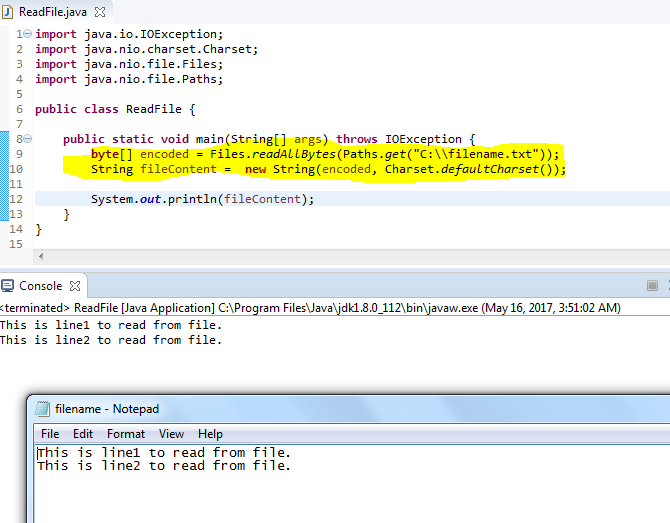
Java - Reading the text content from file with out loop through

Reading the text content from file with out loop through.

Sample Program:
import java.io.IOException;
import java.nio.charset.Charset;
import java.nio.file.Files;
import java.nio.file.Paths;

public class ReadFile {
public static void main(String[] args) throws IOException {
byte[] encoded = Files.readAllBytes(Paths.get("C:\\filename.txt"));
String fileContent = new String(encoded, Charset.defaultCharset());

System.out.println(fileContent);
}
}


Reading the text content from File using 'while' loop.

Sample Program:
import java.io.BufferedReader;
import java.io.FileReader;

public class Read2File {
public static void main(String[] args) {
try {
FileReader fileReader = new FileReader("C:\\filename.txt");
BufferedReader bufferedReader = new BufferedReader(fileReader);
String fileLine = null;
StringBuffer temp = new StringBuffer();
while((fileLine = bufferedReader.readLine()) != null) {
                              temp.append(fileLine+"\n");
                        }
System.out.println(temp);
bufferedReader.close();
   fileReader.close();
}catch (Exception e) {
e.printStackTrace();
}
}
}

Monday, 1 May 2017

Java - Reading the text content(xml/json) with out loop through 'InputStreamReader'

Reading the text content(xml/json) with out loop through 'InputStreamReader'.

Prerequisite:
Requires java 8 to execute below program

Sample Program:
import java.io.BufferedReader;
import java.io.InputStreamReader;
import java.net.HttpURLConnection;
import java.net.URL;
import java.util.stream.Collectors;

public class Test8WsGet {

public static void main(String[] args) {
try {

URL url = new URL("http://thomas-bayer.com/sqlrest/CUSTOMER/2/");
HttpURLConnection connection = (HttpURLConnection) url.openConnection();
connection.setRequestMethod("GET");
connection.setRequestProperty("Accept", "application/json");

if (connection.getResponseCode() != 200) {
throw new RuntimeException("Failed with HTTP error code : " + connection.getResponseCode());
}

String responseXml;
System.out.println("Response xml from Server .... \n");

BufferedReader bufferReader = new BufferedReader(new InputStreamReader(connection.getInputStream()));
responseXml = bufferReader.lines().collect(Collectors.joining("\n"));

System.out.println(responseXml);

connection.disconnect();
} catch (Exception e) {
e.printStackTrace();

}
}
}
Troubleshooting :
If you are executing above program using maven(i.e. pom.xml) then add below maven-compiler-plugin
Reference: https://maven.apache.org/plugins/maven-compiler-plugin/examples/set-compiler-source-and-target.html
    <plugins>
      <plugin>
        <groupId>org.apache.maven.plugins</groupId>
        <artifactId>maven-compiler-plugin</artifactId>
        <version>3.6.1</version>
        <configuration>
          <source>1.8</source>
          <target>1.8</target>
        </configuration>
      </plugin>
    </plugins>


Reading the text content(xml/json) from 'InputStreamReader' using 'while' loop.

Sample Program:
import java.io.BufferedReader;
import java.io.InputStreamReader;
import java.net.HttpURLConnection;
import java.net.URL;

public class TestWsGet {

public static void main(String[] args) {
try {

URL url = new URL("http://thomas-bayer.com/sqlrest/CUSTOMER/2/");
HttpURLConnection connection = (HttpURLConnection) url.openConnection();
connection.setRequestMethod("GET");
connection.setRequestProperty("Accept", "application/json");

if (connection.getResponseCode() != 200) {
throw new RuntimeException("Failed with HTTP error code : " + connection.getResponseCode());
}

String responseXml;
System.out.println("Response xml from Server .... \n");

BufferedReader br = new BufferedReader(new InputStreamReader((connection.getInputStream())));
while ((responseXml = br.readLine()) != null) {
System.out.println(responseXml);
}

connection.disconnect();
} catch (Exception e) {
e.printStackTrace();
}
}
}